

Introduction
This is a series of posts about my experience building RAG (Retrieval-Augmented Generation) systems.
The goal of this series:
Part 1: explain what RAG is and why it exists
Part 2: explore components and techniques to improve quality
Part 3: share practical lessons and adjustments from real implementations
This Part 1 is introductory. If you already work with RAG systems, you can skim or skip parts of it.
When someting needs a little bit more nuance, you'll see , click it for nuance.
What is RAG
Simply put, RAG is of data, that you can query and use in LLM promts. There are two main reasons for this. First, LLMs don't know your data — either because it's private, or because it changed after the model was trained (Who is the current US president?). Second, RAG helps reduce plausible-but-too-general responses by grounding LLM answers in specific sources, by setting a context (Who is the CEO of our company?").
Since LLMs are language models, in RAG we mostly store
If you had an unlimited token window, unlimited money and time, you'd need RAG less — you could just pass all your data directly into the prompt: "based on ALL_MY_DATA, what does my dog like to play?" And we're moving in that direction: tokens are getting cheaper, context windows are growing, responses are getting faster. Even so, RAG will likely remain useful for grounding and focusing the LLM on the most relevant information.
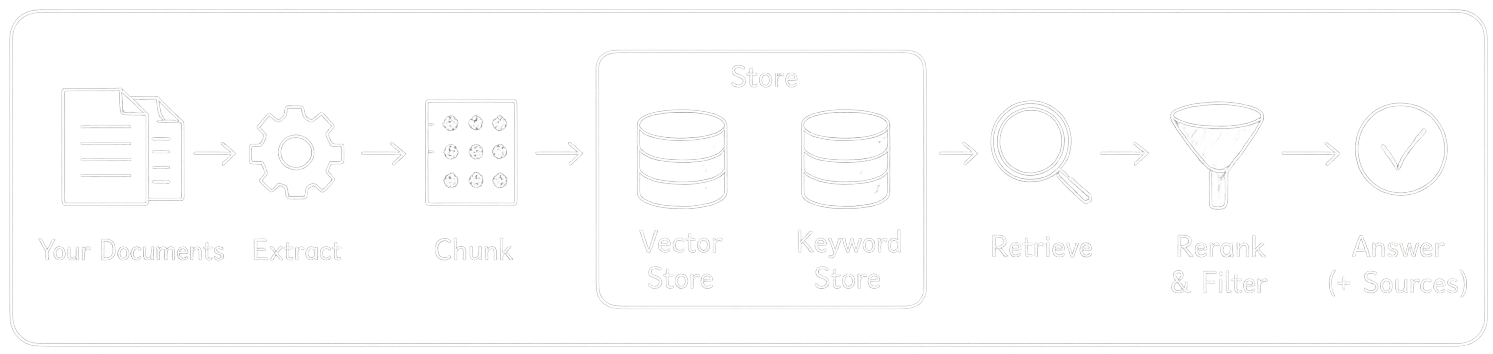
There are basically 3 steps to using RAG: ingest your data into the store, then query relevant pieces, and use them in your LLM prompt. Each of those steps has its own rainbow of techniques and stages.
Ingest
Extract
First, we take a document (PDF, CSV, doc, txt), extract the text, normalize it, cut it into pieces (chunks), embed chunks , and store them.
Extraction is difficult but crucial — bad input means bad output. The main problem is loss of logical structure and loss of non-textual data (images). More concretely: columns, headers, footers, line breaks, paragraphs, and titles all get mixed together. Tables structure can be lost, cells flattened. In PDFs, text may not be stored in logical reading order. Code and scientific formulas go into the mix too. We can hope the LLM will sort it out, but retrieval will suffer directly. On top of that, extracting text from images (a PDF can be just a scan, professional presentations are full of images) requires OCR, and managing the output structure is its own challenge. If you've ever parsed websites, it's similar — you're constantly handling exceptions.
There's no silver bullet, but some tools are worth knowing. PyMuPDF is fast and good for straightforward PDFs with real text. Unstructured handles messier documents — mixed layouts, tables, images — and is probably the most complete open source option right now. Docling (from IBM) is newer but strong on complex PDFs and table extraction specifically. For OCR, Tesseract is the classic open source option.
My suggestion: stay close to your actual data, don't try to handle every case upfront, start simple, build test cases for retrieval, and iterate. Even if you end up using one of these libraries, it's worth exploring the limits yourself first — you'll understand your data much better for it.
Chunk
Once we have well-structured text, the next step is cutting it into pieces — chunks. A chunk is both the retrieval unit (what we search for) and the knowledge unit (what we pass to the LLM). If a chunk is too short, retrieval is precise but the context passed to the LLM is thin. If it's too long, the LLM gets richer context but the embeddings are noisier and harder to retrieve
Some chunking options to consider: preserve structure (titles with their corresponding paragraphs), avoid splitting mid-sentence, apply overlap to preserve semantic meaning at chunk edges (but not too much — 10% is reasonable, more and you'll bloat your index with duplicates). Keep in mind that the right chunk size depends on your query patterns and the context window of your LLM. Always add metadata to each chunk: document ID, page ID, chunk number — it'll be useful later.
One powerful technique worth knowing: semantic chunking. You embed sentence by sentence, compare adjacent sentence embeddings, and split where similarity drops — meaning the concept has shifted. It adds overhead and takes more time, but can produce much cleaner chunks.
Embed and Store
There are basically two ways to store chunks: a vector store and a keyword store.
Vector store: you embed the chunk semantics into vector [0.23, -0.11, 0.87, ...], store it alongside the original text and metadata.
The vector captures semantic meaning and enables fast similarity search at scale. Main options: Pinecone, Weaviate (managed cloud), pgvector (Postgres extension), FAISS, Chroma (local).
Keyword store: an inverted index — think . No embeddings. Stores which words appear in which chunks. Fast exact match. Works great when the user query contains specific terms, product names, codes, or IDs.
In my experience, both should work together. People search by exact product name, error code, contract number — keyword wins there (Give me RFC 1918 details please). People search by concept, intent, or question — vector wins (need a specification for private network ranges). Depending on your data and query patterns, one will outperform the other.
Retrieve
So we have our chunks stored. Now we need to find the right ones for a given query. The idea is simple: we embed the query the same way we embedded our chunks, and search for the chunks with the closest embedding. Closest embedding means similar semantic meaning.
Question: "What does Jack like to play?"
Embedded question: [0.23, -0.11, 0.87, ...]
Closest chunks: "My dog likes to play ball", "My dog is named Jack. He is 3 years old."
This is called vector similarity search. The most common metric is cosine similarity. You take the top K chunks (top 10, top 20 — depends on your case).
Problem: pure semantic search misses exact keyword matches. If a user asks "what is RFC 1918", semantic search may return something conceptually related but not the exact document. would nail it.
We can combine them in hybrid search — you run semantic search and keyword search in parallel, then merge the results.
Reranking: after retrieval you have say 20 candidates. You take your question, pair it with each retrieved chunk, and estimate how likely that chunk is to have generated the answer. You can't do this at search time for all chunks (that would mean running the LLM over your entire index), but for 20 candidates it's fine. You reorder them and take the top 5. More expensive, but better quality. Good pattern: retrieve wide (top 20), rerank, pass top 5 to LLM.
Metadata filtering: You can filter before searching — "only search documents uploaded by this user", "only search pages from this year." This reduces search space and avoids privacy issues.
Use in the LLM
The basic pattern is straightforward: you take your retrieved chunks, concatenate them into a block of context, and inject them into your prompt alongside the user's question.
You are a helpful assistant. Answer the question based on the context below.
Context:
[chunk 1 text]
[chunk 2 text]
[chunk 3 text]
Question: [USER_QUESTION]
Answer:
A few things matter here:
Order of chunks. LLMs tend to pay more attention to the beginning and end of the context window.
Context size. You're limited by the LLM's context window. If your chunks are large or you're passing many of them, you can hit the limit fast.
Prompt instructions. Tell the LLM explicitly to answer only from the provided context. Otherwise it will blend in its general knowledge, which defeats the purpose of RAG. Something like: "If the answer is not in the context, say you don't know." This sounds simple but makes a real difference in practice.
Citation. If it matters for your use case, you can ask the LLM to reference which chunk it used. Pass the metadata (document name, page) alongside each chunk, and ask it to cite its sources. Useful for trust and debugging.
This step is where retrieval quality becomes visible. If your chunks are wrong, the LLM will either hallucinate or say it doesn't know. The prompt assembly step is also where you'll do a lot of your debugging — logging the exact prompt sent to the LLM is one of the most useful things you can do early on.